Subscriptions with KVIQA: recurring revenue via 2fans + UnlockBL
You set a monthly price once. The fan pays through your KVIQA Send Subscribe button. The bot puts them in your VIP channel. When they unsubscribe, the bot kicks them out. Here's how to wire it up.
Prefer to watch? Full video walkthrough
Follow along with the same steps as below, end-to-end.
Send-Buttons cover one-off tips and on-demand profile visits, but most creator revenue on Telegram comes from a single repeating bucket: a monthly VIP channel. KVIQA wires the whole loop (Stripe checkout, Telegram-channel access, and automatic kicks-on-cancel) through your 2fans or UnlockBL vault.
This guide walks through it end to end. Setup time is about 5 minutes once you have a connected vault.
The model in one paragraph
You set a monthly price (e.g. $10 / month) on your creator page on 2fans or UnlockBL. You create a private Telegram channel that holds your VIP content. You add the subscription bot to that channel as an admin and paste the channel's peer ID into the platform's subscription settings. From that point on: a fan taps your Subscribe button → pays Stripe → the bot invites them to your VIP channel. When they cancel or their card fails → the bot removes them. Nothing on your side.
What the fan sees
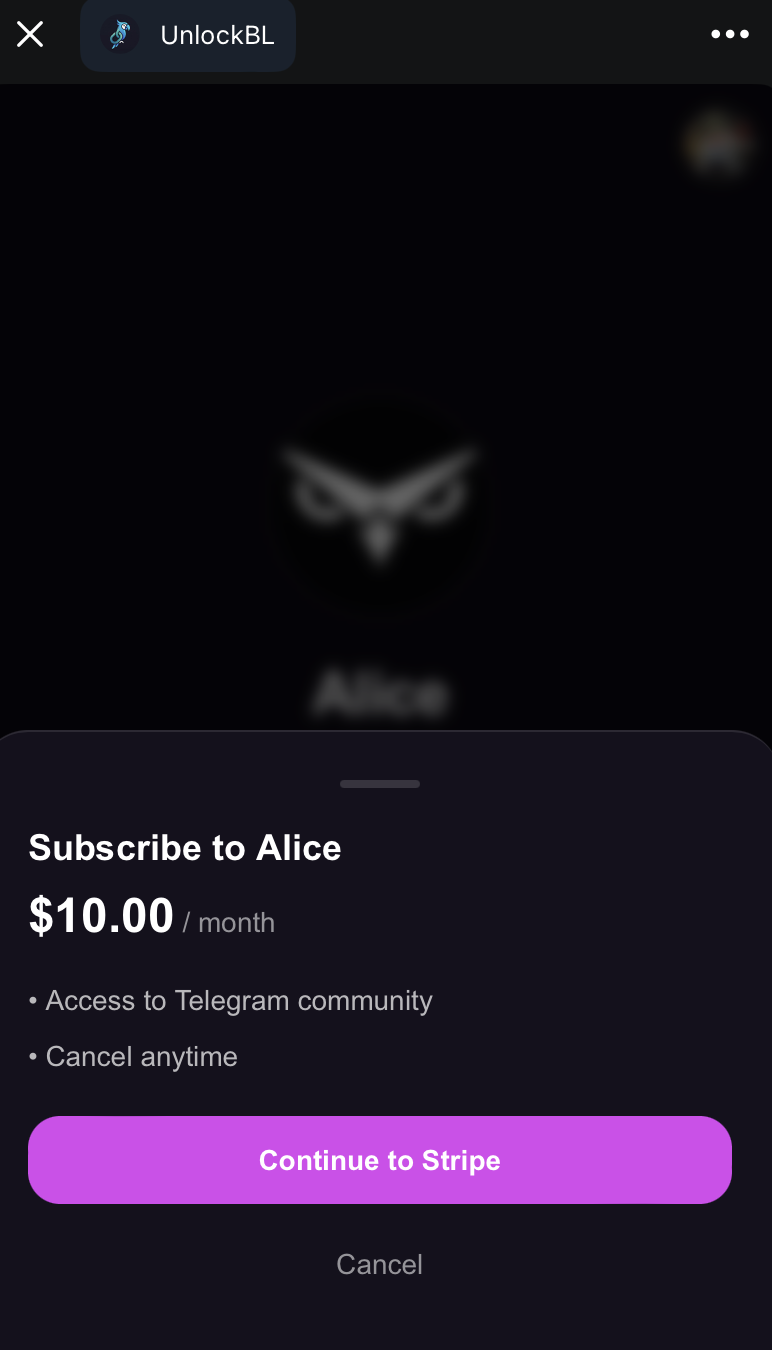
The fan tapped a Send Subscribe button in your conversation (or browsed to your profile directly), saw your price, tapped Continue to Stripe, paid, and is now a paying member. The bot pushes them into the channel within seconds.
Step 1: Set your subscription price
Open your creator dashboard on the platform and navigate to Subscription. Set:
- Monthly price. Pick something defensible. $9.99 / $14.99 / $19.99 are the most common entry tiers; agencies running tiered models often run $9.99 / $24.99 / $49.99.
- Optional trial period. Both platforms let you grant 1 to 14 days free. Useful when your Send-Buttons fire into cold chats: the first-day commitment is lower.
- Short benefits list. Two or three bullets explaining what's in the VIP channel. The Mini App shows them on the paywall sheet (see screenshot above).
Step 2: Create your VIP Telegram channel
In Telegram, create a new private channel. Anything you post here will only be visible to subscribers. Keep it focused: the post cadence and quality is what makes the subscription feel worth renewing.
Grab the channel's peer ID: open the channel info → tap the title to
reveal advanced details, or forward any channel message to
@JsonDumpBot and read off the peer_id. KVIQA also surfaces the
ID inside the Inbox sidebar for any channel you're a member of.
Step 3: Add the subscription bot as channel admin
Each platform has its own subscription-management bot. Add the right one based on the vault you connected:
-
2fans: add
@DROPFANSBOTas an admin. -
UnlockBL: add
@KVIQSUBSBOTas an admin.
Required admin permissions: Invite Users via Link and Ban Users. Nothing else needs to be on: the bot doesn't need to post in your channel, and you explicitly don't want it to.
Step 4: Paste the channel peer ID into the platform
Back in the platform's Subscription settings, paste the channel peer ID you grabbed in Step 2. Save. The platform confirms the bot is an admin and the channel is reachable, then flips the subscription to Live.
Step 5: Drive subscribers via Send-Buttons
Now that the subscription is live, every Send Subscribe button you fire from the KVIQA Composer drops the fan directly onto the paywall sheet shown above. They pay → bot invites → channel access. The flow is closed.
If you haven't set up KVIQA Send-Buttons yet, the prerequisites + 5-step setup live in the Send-Buttons guide.
The cancellation loop (the part nobody else does well)
This is the operational headache that kills most DIY "Telegram-VIP-channel-with-Stripe" setups: who removes the fan when they cancel? Most creators end up either leaving canceled fans inside the channel for weeks (free content for non-payers) or spending hours each month manually cross-referencing Stripe exports against channel membership.
With KVIQA × 2fans / UnlockBL, this is fully automatic:
-
Fan cancels in their Stripe portal → platform fires a
customer.subscription.deletedwebhook → bot kicks the fan out at the next billing-period end. - Fan's card fails on renewal → Stripe retries for ~3 weeks → if all retries fail, the bot kicks them out and the platform marks the subscription as canceled: payment failed.
- Fan resubscribes within a grace window → bot re-invites with a fresh link. Their chatter context inside KVIQA is preserved, so any conversation history is still there.
Mixing Send-Buttons + Subscriptions in the same agency
Send-Buttons are the discovery layer: they get fans onto the paywall. The subscription is the retention layer: it converts a one-time payer into a monthly payer. Most KVIQA agencies see ~30% lift on the click-through from Send Subscribe vs plain links (see the Send-Buttons guide) and an additional ~40% lift on retention when the cancellation loop is automated vs. manually managed.
The combined effect (sharper discovery, automated retention) is what makes 2fans / UnlockBL substantially more efficient than running Telegram subscriptions on a Stripe Checkout link with no platform layer.
Common gotchas
- Don't make the channel public. If the channel has a public username, fans can find it without subscribing. Keep it private, invite-only.
-
Don't add the wrong bot. Adding
@DROPFANSBOTto a channel registered against your UnlockBL subscription (or vice versa) will silently never invite anyone: the platform's webhook talks to its own bot only. - Don't change the channel peer ID after launch. Telegram channels keep a stable peer ID, but if you delete and recreate the channel, the new ID will not match the one on file and the bot will fail to invite. Update the platform settings if you ever migrate channels.
TL;DR
- Set a monthly price on 2fans or UnlockBL.
- Create a private Telegram channel.
- Add the platform's bot as admin (2fans:
@DROPFANSBOT, UnlockBL:@KVIQSUBSBOT). - Paste the channel peer ID into the platform's subscription settings.
- Fire Send Subscribe buttons. The platform + bot handle the rest.
Frequently asked questions
Do I need both 2fans and UnlockBL to run subscriptions?
No. One is enough. Pick whichever platform you already use to sell content. Both expose the same Telegram-channel-managed subscription model: the wiring is identical, only the bot username differs (@DROPFANSBOT for 2fans, @KVIQSUBSBOT for UnlockBL).
What payment method does the fan use?
Stripe. The platform (2fans / UnlockBL) handles the Stripe checkout, including 3DS, card storage, and recurring billing. You don't touch Stripe directly; the platform pays out your share (2fans pays out by crypto, Paxum, MassPay or bank transfer).
What happens when a fan cancels or their card fails?
The subscription enters a "canceled" or "past_due" state, the platform fires a webhook to the bot, and the bot kicks the fan out of your Telegram channel automatically. No manual cleanup. If the card recovers within Stripe's retry window, the bot re-invites them.
Can I run a free trial?
Depends on the platform: both 2fans and UnlockBL support a configurable trial period on the subscription product. If you set a 7-day trial, the bot grants channel access immediately and the kick only fires if the fan cancels before day 7 or their card fails at the first real charge.
Does the bot need to be a full channel owner?
No. Admin rights with "Invite Users via Link" and "Ban Users" are enough. The bot does not need post or message permissions, so it can't spam your VIP channel even if compromised.
What if I already have an existing VIP channel with members?
You can connect it. The bot will not touch existing members: it only manages members it invites going forward. If you want a clean cohort, archive the old channel and start a new one.
KVIQA is the all-in-one Telegram OFM CRM and creator-chatter marketplace. See pricing, browse the blog, or read the Telegram CRM overview.