Send Subscribe / Tip / Profile buttons in KVIQA: setup guide (2fans + UnlockBL)
A small gift icon next to the Vault button in every fan conversation. One tap fires a Telegram message with an inline action button that drops the fan directly into your 2fans or UnlockBL Mini App. Here's the full setup.
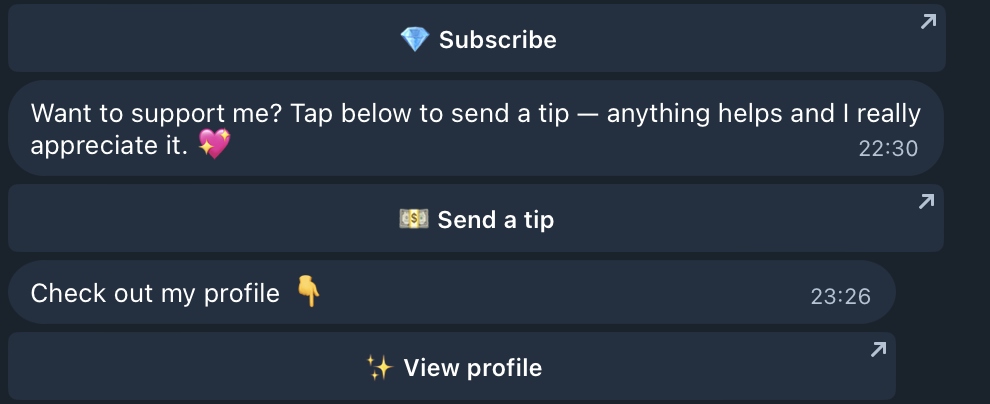
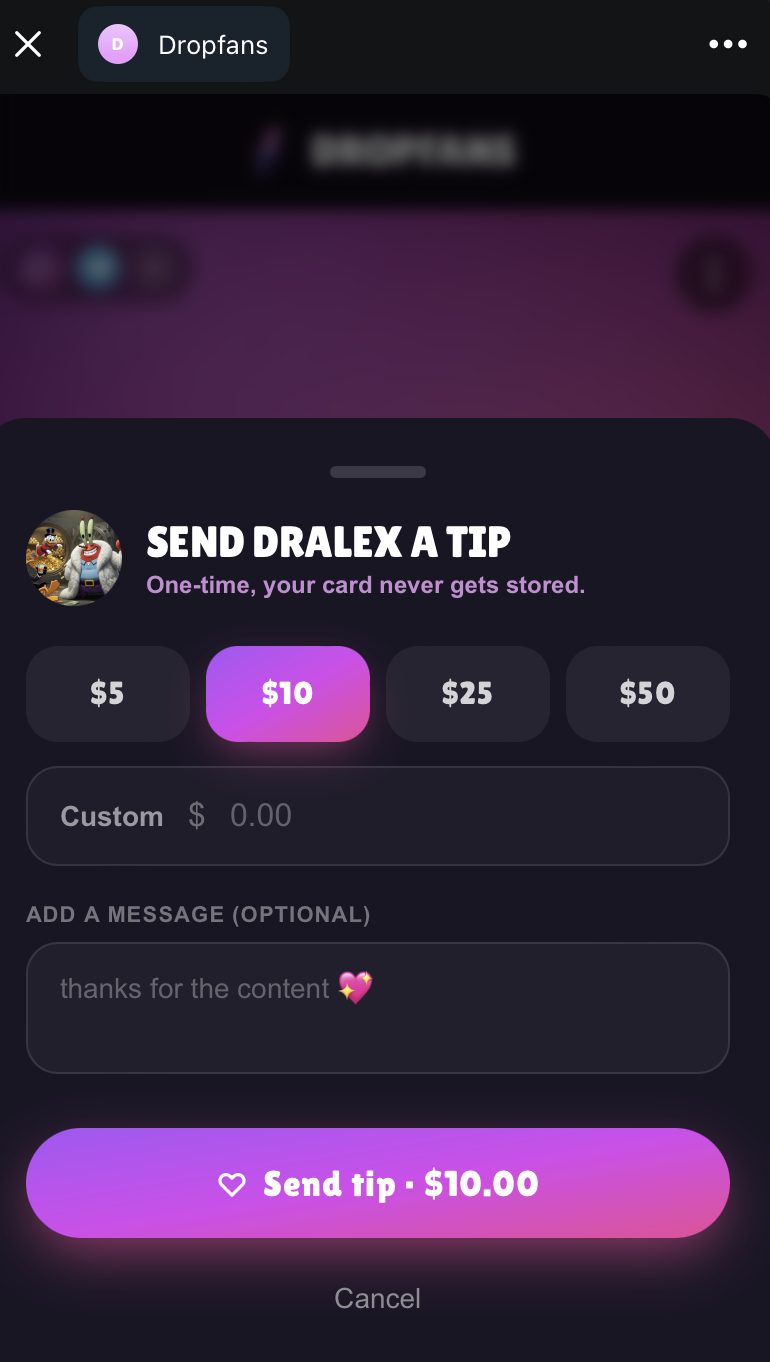
If you sell on 2fans or UnlockBL, KVIQA now shows a small gift icon next to the Vault button in every fan conversation. One tap sends a Telegram message with an inline action button (Subscribe, Send a tip, or View profile) that drops the fan directly into your Mini App on the matching platform. No copy-pasting checkout links, no leaving the chat, no friction.
Average tip-conversion lift across the agencies we tested it with: ~30%. Reason it works: the fan goes from three taps (read → copy → tap) to one (tap).
What you need
- A KVIQA account with at least one Telegram account connected.
- Telegram Premium on the account you want to send buttons from. Telegram Business (and therefore Chatbots) is gated behind Premium.
- KVIQBOT attached as your Business Chatbot. The bot is what KVIQA uses to send the inline-keyboard message on the creator's behalf. Without it, the Composer gift icon stays hidden.
- A connected 2fans or UnlockBL vault (or both: KVIQA will show a two-step menu when both are wired).
Step 1: Connect your 2fans or UnlockBL vault
Open the Team Board, click your creator card, and use the Vault
section to paste your API key. 2fans keys start with dpfn_, UnlockBL keys
start with ulbl_ (legacy unbl_ keys are also accepted). The
creator's public @handle is pulled automatically from the platform: you do not need to
type it in anywhere.
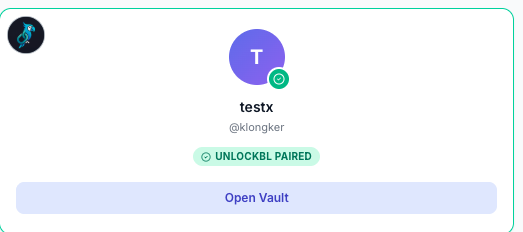
Once connected, the card shows e.g. 2fans connected: alex_demo or UnlockBL connected: alicesecret.
Step 2: Make sure you have Telegram Premium
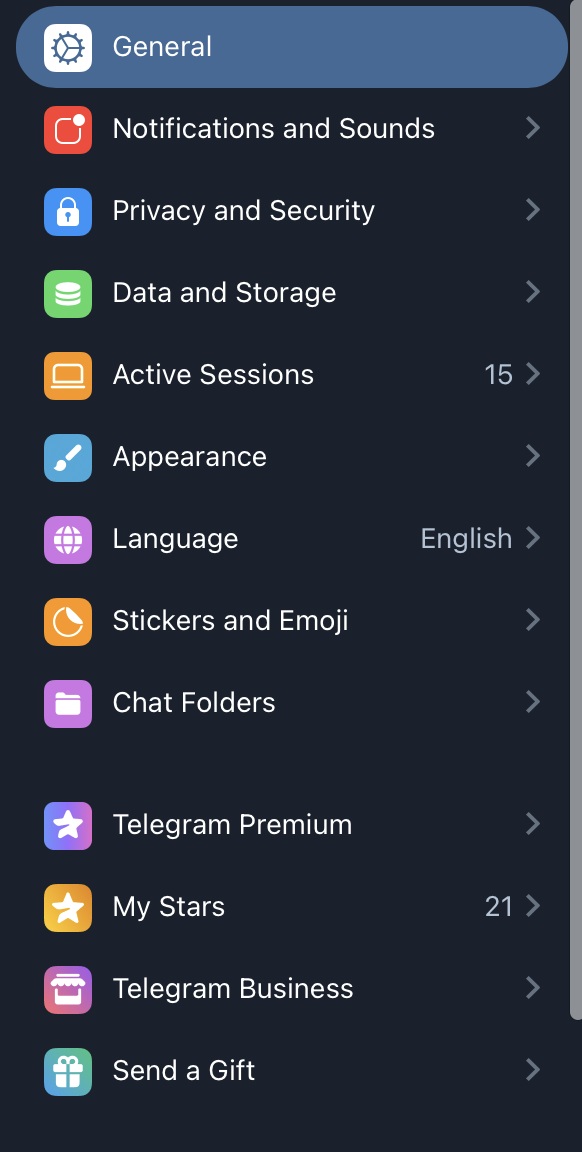
Open Telegram → Settings. If you do not see a Telegram Business row, you need to subscribe to Telegram Premium first. Premium is what unlocks Business Chatbots, which is what KVIQA uses to fire the inline-keyboard message.
Step 3: Open Telegram Business → ChatBots
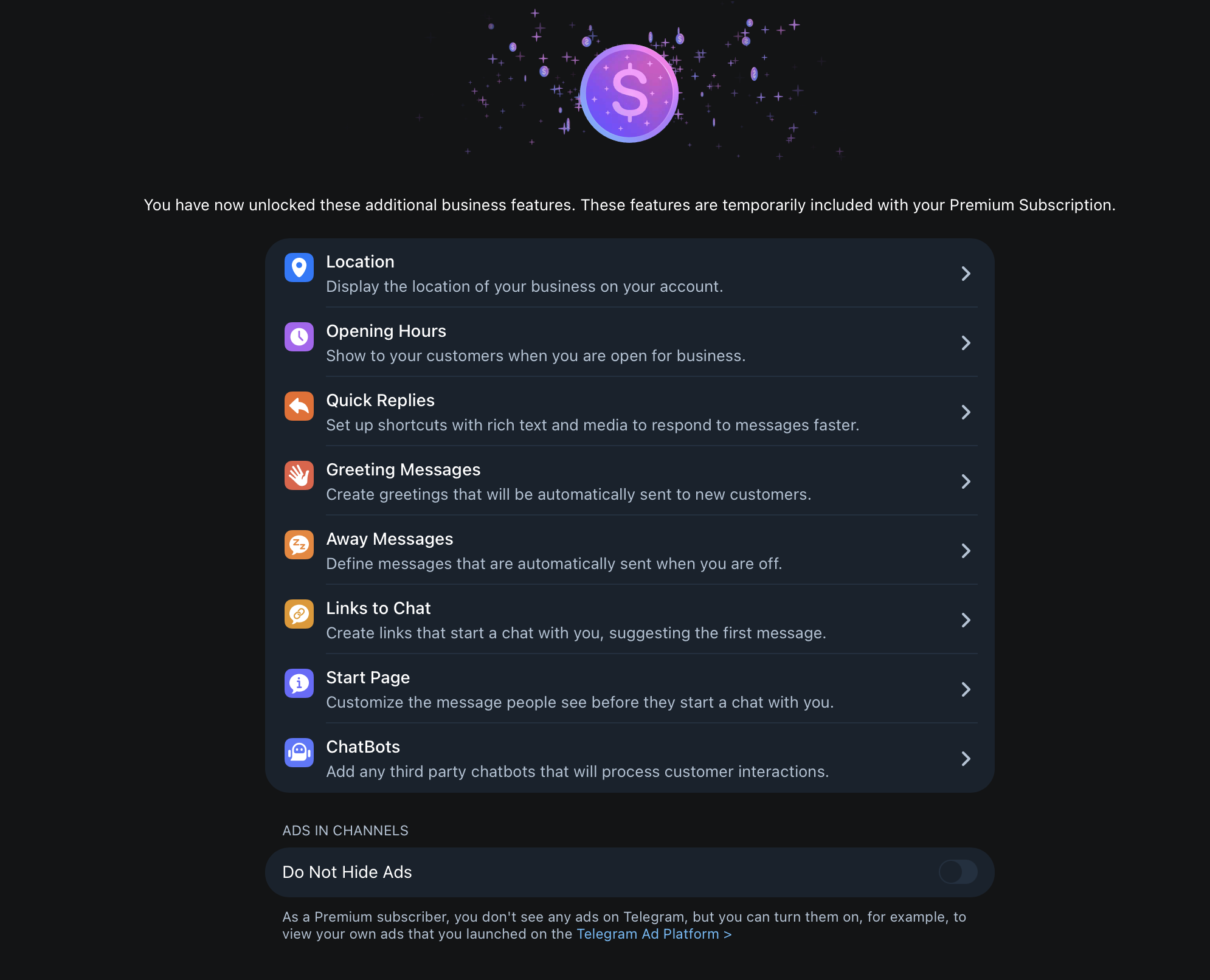
Inside Telegram Business, scroll down to the ChatBots row at the bottom of the unlocked-features list. Tap it.
Step 4: Add @KVIQBOT
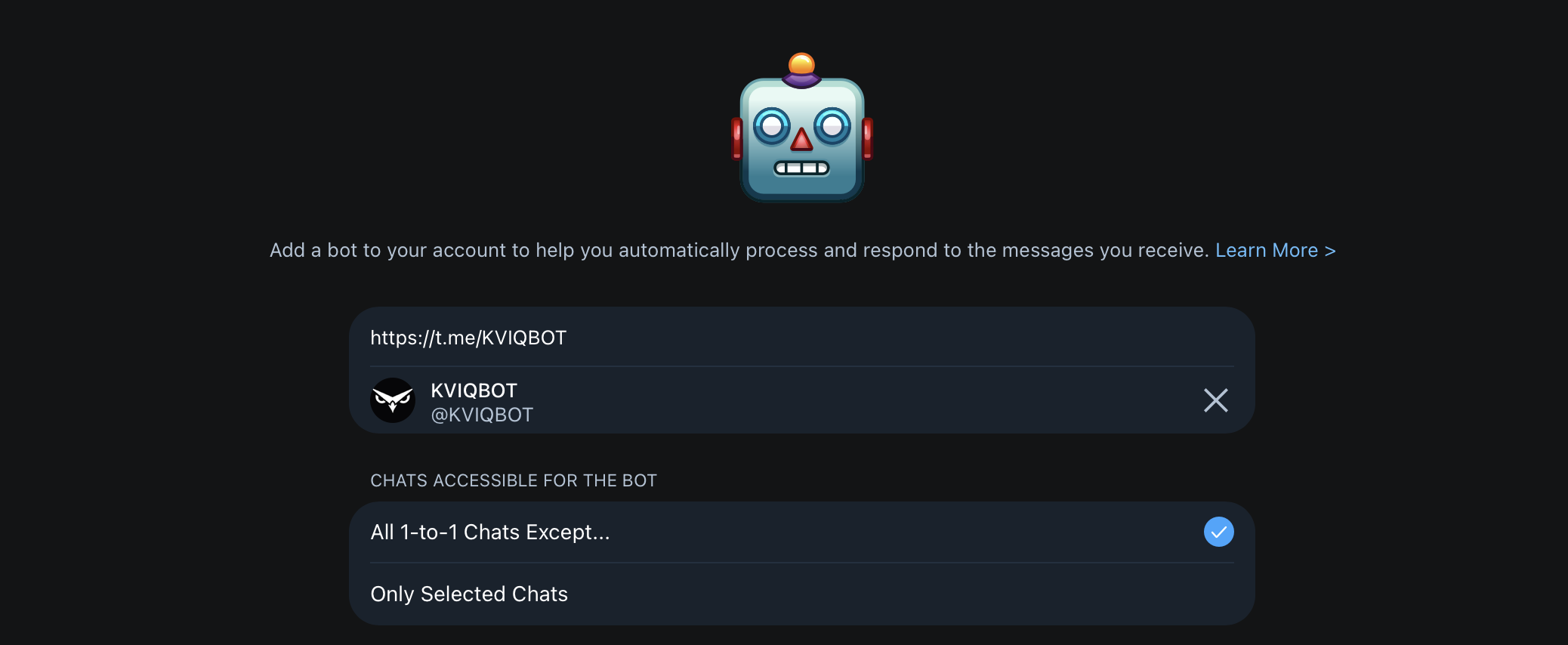
In the bot field, paste https://t.me/KVIQBOT (or just type
@KVIQBOT). For Chats accessible for the bot, choose
All 1-to-1 Chats Except… unless you want to restrict to a subset.
That's it. Switch back to KVIQA: the gift icon will appear in the Composer toolbar within a second.
Step 5: Send a button
Open any 1-to-1 fan chat. Tap the gift icon. Pick Send Subscribe button, Send Tip button, or Send Profile link. If both 2fans and UnlockBL are connected, you'll see a two-step menu: pick the platform first, then the action.
The fan receives a normal Telegram message with a single inline-keyboard button. Tapping it opens the matching Mini App right on your creator profile, with the tip / subscribe sheet pre-opened.
Important: the "Fan must message first" rule
Telegram does not allow a Business Chatbot to send the first message in a conversation. The fan needs to have sent you at least one message after you attached KVIQBOT before you can fire a Send-Button into that chat. This is a Telegram Terms-of-Service rule, not something KVIQA can route around.
If you try to send a button into a stale conversation, KVIQA will show: "The fan needs to message this account first…". Wait for the fan to ping you, then send the button. From that point on, the conversation is unlocked.
Why only 2fans and UnlockBL?
Both platforms expose a shared Telegram
Mini App (@DROPFANSBOT and @UNLOCKBLBOT) which is what the
button deep-link opens. The Mini App reads the start parameter, looks up your creator
profile, and renders the right action sheet (subscribe, tip, profile) inside Telegram.
OnlyFans, Fansly, Fanvue, and traditional Stripe checkouts do not (yet) ship a Telegram Mini App: there's nowhere for the button to deep-link into. The moment a partner ships one, we'll wire it in the same way.
Conversion data
Across the agencies we tested Send-Buttons on, the tip-button shows a ~30% conversion lift versus posting the same 2fans tip link as plain text. The subscribe button shows a similar lift on click-through, because the fan never leaves Telegram: the Mini App opens inline. The single-tap path is the entire reason.
TL;DR
- Connect a 2fans or UnlockBL vault in Team Board.
- Make sure your Telegram account has Premium.
- Telegram → Settings → Business → ChatBots → add
@KVIQBOT. - Wait for the fan to message you (Telegram TOS), then tap the gift icon.
- Pick the action. Watch conversion go up.
Frequently asked questions
Why don't I see the gift icon in my Composer?
The icon only appears when your active account has BOTH a connected 2fans or UnlockBL vault AND an active KVIQBOT Business connection. Connect the vault in the marketplace Team Board, then add @KVIQBOT as your Telegram Business chatbot. The icon auto-appears within a second after both are in place.
Do I need Telegram Premium?
Yes. Telegram Business (Chatbots) requires Telegram Premium. Without Premium, you cannot attach KVIQBOT to your account, and the Send-Buttons cannot fire.
Why is the Subscribe button blocked the first time I try it?
Telegram's Business API does not allow a bot to send a proactive message to a fan who hasn't messaged the creator since the bot was attached. Once the fan sends you any message, even just "hi", proactive Send-Buttons are unlocked for that conversation. This is a Telegram-side rule, not a KVIQA limit.
Does this work with OnlyFans or Stripe?
Not yet. Send-Buttons currently only ship for 2fans and UnlockBL because both expose a shared Mini App on Telegram (@DROPFANSBOT and @UNLOCKBLBOT). OnlyFans, Fansly, and Fanvue have no equivalent Telegram Mini App, so there's nothing to deep-link into. We will extend this the moment a partner ships a comparable Mini App.
How much does conversion actually improve?
Internal data across KVIQA agencies running Send-Buttons on 2fans shows an average +30% lift on tip conversion and a similar lift on subscribe-flow click-through versus posting the same checkout link as plain text. The button reduces the number of taps from three (read → copy → tap) to one (tap), which is the entire reason it works.
KVIQA is the all-in-one Telegram OFM CRM and creator-chatter marketplace. See pricing, browse the blog, or read the Telegram CRM overview.