# Pay to Chat: make time-wasters tip before they reach you (Telegram + Dropfans)
> Pay to Chat is a KVIQA gate that makes a new customer send a tip before a chatter engages. It filters out time-wasters, replaces high-chargeback subscriptions with a low-friction one-tap tip, and runs on your connected Dropfans vault. Here is how it works and how to turn it on.
**Canonical URL:** https://kviqa.com/blog/pay-to-chat
**Published:** 2026-07-09
**Author:** KVIQA Team
**Category:** Monetization
**Reading time:** 4 min
**Tags:** Pay to Chat, Dropfans, KVIQBOT, Tips, Time-wasters, Telegram Business
**Cover:** https://kviqa.com/blog-covers/pay-to-chat.svg
Tired of chatters burning hours on people who never spend? Pay to Chat makes a new customer send a tip of any amount before the conversation opens. One tap, no subscription, far less fraud. Here is the full breakdown.
---
Most wasted chatter hours go to people who were never going to spend. They open a chat, ask for free content, negotiate a price they will never pay, and vanish. **Pay to Chat** is a KVIQA gate that removes them from the equation: a new customer has to send a **tip of any amount** before the conversation opens. It is Telegram-first, runs on your connected **Dropfans** vault, and is off by default until you turn it on per account.
Why a tip and not a subscription? Subscriptions carry high refund and chargeback rates precisely because they are a recurring commitment. A one-tap tip is a low-friction filter: a time-waster will not send even a small one, and a real customer clears it in a single tap.
## At a glance in your inbox
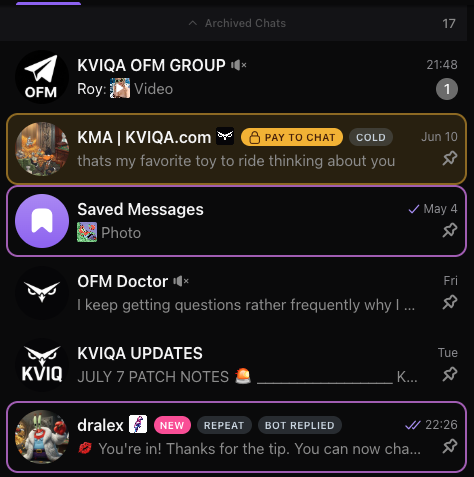
Every fan who has not paid yet gets a yellow **PAY TO CHAT** lock overlay right in the chat list, so a chatter can see who is gated without opening the conversation. The moment a customer tips, the overlay clears and the chat looks completely normal.
Locked customers carry a yellow PAY TO CHAT badge. Once they tip, the badge disappears and
the conversation is live (see the unlocked "You're in!" chat at the bottom).
## What the customer sees
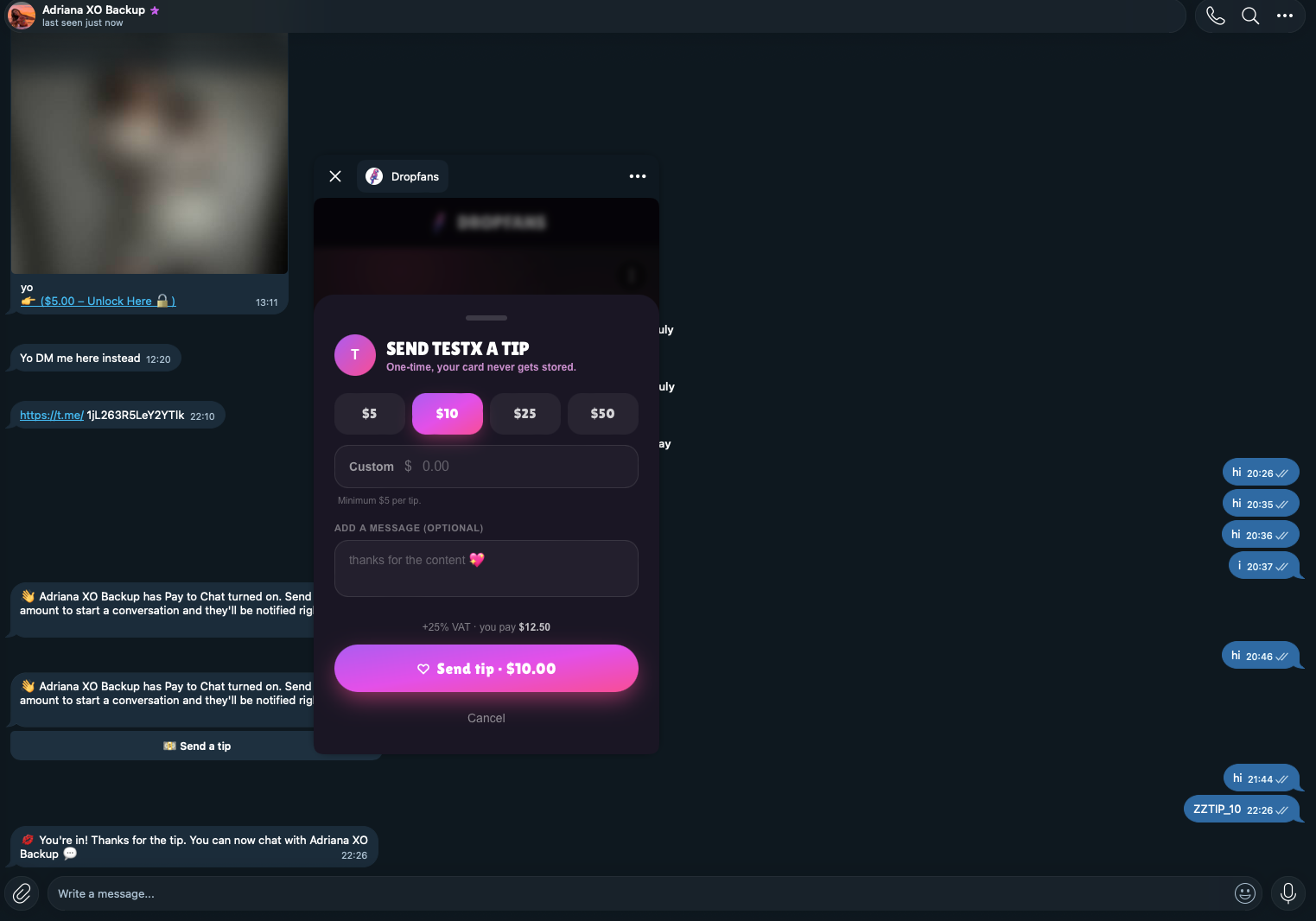
When a locked customer messages the account, the KVIQ bot replies once with a short prompt and a one-tap **Send a tip** button. It does not lecture, it does not repeat itself, and it costs no AI tokens. If they keep typing without tipping, the bot simply stays quiet.
One clean prompt with a Send a tip button. The button deep-links straight into your
Dropfans tip sheet inside Telegram.
## The unlock, end to end
Tapping *Send a tip* opens the Dropfans Mini App right inside Telegram, with preset amounts and an optional message. The customer taps once to pay. The instant the tip lands, the conversation opens: the customer gets a *"You're in! Thanks for the tip"* confirmation, an owner and chatter alert fires in the CRM, and the chat surfaces at the top of your inbox.
Prompt, tip sheet, unlock. The whole flow stays inside Telegram, and the "You're in!"
message confirms the conversation is now open.
## Two modes: every conversation, or once for life
When you enable Pay to Chat you choose how often a customer has to pay:
- **Every conversation.** The chat stays open until a chatter taps the red *End Convo* button in Fan Insights. After that, the customer must tip again to re-open it. Best for high-volume accounts that want a fresh filter on each session.
- **One time.** A single tip unlocks that customer for life. The End Convo control is hidden in this mode, so a paid customer can never be accidentally re-locked. Best when you just want to strain out the tourists once.
## Let specific customers skip it
Enabling Pay to Chat reveals an **Accept for** picker. Search your customers and add anyone who should bypass the gate entirely, such as long-term VIPs or fans you already know convert. Everyone else stays gated.
## What you need
- A connected **Dropfans** vault on the creator. The tip button and the unlock both run on Dropfans, so the toggle stays disabled without it.
- **KVIQBOT attached as your Telegram Business chatbot** (which needs Telegram Premium). This is what sends the prompt and the tip button on the creator's behalf.
Then open **Account Settings**, flip *Pay to Chat* on, pick a mode, and add any exemptions. It is off for every account by default, so nothing changes until you deliberately turn it on.
## TL;DR
1. Connect a Dropfans vault and attach KVIQBOT to the account.
2. Account Settings, turn on Pay to Chat, choose Every conversation or One time.
3. New customers must tip before a chatter engages. Time-wasters filter themselves out.
4. A tip unlocks the chat instantly, with a "You're in!" confirmation and a CRM alert.
5. Add trusted customers to Accept for so they never see the gate.
---
## FAQ
### How is Pay to Chat different from a subscription?
A subscription is a recurring commitment, which is exactly why it attracts refund abuse and chargebacks. Pay to Chat asks for a single, low-friction tip of any amount before the conversation opens. It is a filter, not a billing plan. A time-waster will not send even a small tip, so your chatters never spend time on them, and a real customer unlocks in one tap.
### Do I need a Dropfans vault connected?
Yes. The "Send a tip" button and the unlock detection both run on Dropfans, so the Pay to Chat toggle stays disabled until your creator has a connected Dropfans vault. Connect it from the Team Board, then the toggle unlocks in Account Settings.
### Will it spam my fans?
No. When a locked customer messages, the bot sends the tip prompt once per attempt, then goes completely silent no matter how much they type. It only re-sends if they come back much later. It never nags.
### What actually unlocks the conversation?
Any Dropfans tip, any amount, unlocks it. A Dropfans PPV or vault purchase unlocks it too. The moment the payment lands, the customer gets a "You are in" confirmation, the conversation jumps to the top of your inbox, and your chatters can engage.
### What is the difference between "Every conversation" and "One time"?
Every conversation keeps the chat open until a chatter ends it with the "End Convo" button, after which the customer must tip again to re-open it. One time is lifetime access: a single tip unlocks that customer forever, and the End Convo control is hidden so nobody accidentally re-locks a paid customer.
### Can I let specific customers skip the gate?
Yes. When you enable Pay to Chat, an "Accept for" picker appears. Search and add any customers who should bypass the gate entirely, for example long-term VIPs or people you already know convert.
---
## About KVIQA
KVIQA is the all-in-one Telegram OFM (TG OFM) CRM and creator-chatter marketplace. Unified omnichannel inbox (Telegram + OnlyFans + WhatsApp pilot), built-in chatter hiring marketplace, AI auto-responder (KVIQ BOT), encrypted Telegram sessions, and unified earnings attribution across every connected platform and payment rail.
- Site: https://kviqa.com/
- Full product reference (LLM-friendly): https://kviqa.com/llms-full.md
- Blog index: https://kviqa.com/blog
- Pricing: https://kviqa.com/pricing
- Safety & legal: https://kviqa.com/safety